

PMBOK 8 groups all 40 project management processes into five Focus Areas — Initiating, Planning, Executing, Monitoring & Controlling, and Closing. If you learned project management from an earlier edition, you know them by their old name: Process Groups. The rename is not cosmetic, and this page is the index that follows them.
This page is the index of the five PMBOK 8 Focus Areas and the forty processes inside them. Below are the 40 PMBOK 8 processes in the order a project actually runs them, grouped by Focus Area, each one linked to its full guide on this site and carrying the chapter where it appears in the book PMBOK 8 in Action. Read it top to bottom and you walk a project from authorization to closure. Jump to the row you need and it is a lookup table.
| Focus Area | How many | Process nos. | The question it answers |
|---|---|---|---|
| Initiating | 2 | 1–2 | Is this worth doing, and do we have the mandate to begin? |
| Planning | 19 | 3–21 | How will we get there — scope, schedule, money, people, risk? |
| Executing | 8 | 22–29 | Who does the work, and how do we lead it while it happens? |
| Monitoring and Controlling | 10 | 30–39 | Are we on track — and if not, what do we change? |
| Closing | 1 | 40 | Is it accepted, handed over, and did we keep what we learned? |
1. What Are the PMBOK 8 Focus Areas?
A Focus Area is a category of management action that applies across the whole project, no matter how many phases it has. PMBOK 8 defines five of them, and every one of the 40 processes belongs to exactly one.
The distinction that matters is this: phases describe what work gets done and when; Focus Areas describe what management action is needed throughout. They are not a rigid sequence. On any given day a project manager may be executing, monitoring and replanning at the same time — and Monitoring & Controlling runs continuously, in parallel with Executing, from the first deliverable to the last.
The five Project Management Focus Areas represent the fundamental categories of management action that occur across any project, regardless of methodology or phase structure.
— PMBOK Guide, Eighth Edition, Section 1
Two consequences follow, and both show up in the tables below. First, a Focus Area is not a stage you finish: Identify Stakeholders sits in Initiating, but stakeholder work continues through four Focus Areas. Second, Planning holds nineteen of the forty processes — almost half — and that concentration is exactly what tailoring exists to manage.
2. Initiating — 2 Processes (Chapters 2–3)
Initiating is where the project is formally authorized: the business case is approved, the sponsor commits the budget, the manager is assigned, and the key stakeholders are identified. It answers one question — is this worth doing, and do we have the mandate to begin?
| # | Process — and what you do in it | Key outputs | Performance domain |
Book chapter |
|---|---|---|---|---|
| 1 | Initiate Project or Phase Authorize the work and name the sponsor, the manager and the mandate. |
Project Charter, Assumption Log | Governance | 2 |
| 2 | Identify Stakeholders Find out who has authority, interest or influence over the project — before you plan it. |
Stakeholder Register | Stakeholders | 3 |
3. Planning — 19 Processes (Chapters 4–22)
Planning defines how the project will get where it committed to go: scope, schedule, cost, resources, stakeholders, communications, risk and sourcing — ending with the one process that makes the rest a single plan instead of nine plans that disagree, Integrate and Align Project Plans.
| # | Process — and what you do in it | Key outputs | Performance domain |
Book chapter |
|---|---|---|---|---|
| 3 | Plan Scope Management Decide how scope and requirements will be defined, approved and changed. |
Scope Management Plan, Requirements Management Plan | Scope | 4 |
| 4 | Elicit and Analyze Requirements Draw out what stakeholders actually need and trace each requirement to its source. |
Requirements Documentation, Requirements Traceability Matrix | Scope | 5 |
| 5 | Define Scope Write down what is in and — the harder half — what is out. |
Project Scope Statement | Scope | 6 |
| 6 | Develop Scope Structure Break the scope into work packages and freeze the scope baseline. |
WBS, WBS Dictionary, Scope Baseline | Scope | 7 |
| 7 | Plan Schedule Management Decide how the schedule will be built, measured and re-baselined. |
Schedule Management Plan | Schedule | 8 |
| 8 | Estimate Resources Say what people, equipment and materials each work package needs. |
Resource Requirements, Resource Breakdown Structure, Basis of Estimates | Resources | 9 |
| 9 | Develop Schedule Sequence the work, apply durations and commit to dates. |
Schedule Baseline, Project Schedule, Schedule Data | Schedule | 10 |
| 10 | Plan Financial Management Decide how money will be estimated, approved, funded and controlled. |
Financial Management Plan | Finance | 11 |
| 11 | Estimate Costs Put a number on each work package and record how you got there. |
Cost Estimates, Basis of Estimates | Finance | 12 |
| 12 | Develop Budget Aggregate the estimates into a time-phased budget with contingency. |
Cost Baseline, Project Funding Requirements | Finance | 13 |
| 13 | Plan Resource Management Decide how the team will be acquired, developed and how it will work together. |
Resource Management Plan, Team Charter | Resources | 14 |
| 14 | Plan Stakeholder Engagement Choose the engagement strategy for each stakeholder you registered. |
Stakeholder Engagement Plan | Stakeholders | 15 |
| 15 | Plan Communications Management Decide who gets what information, in what format, how often. |
Communications Management Plan | Stakeholders | 16 |
| 16 | Plan Risk Management Set the risk appetite, the scales and who owns risk decisions. |
Risk Management Plan | Risks | 17 |
| 17 | Identify Risks List the threats and the opportunities — both belong in the register. |
Risk Register, Risk Report | Risks | 18 |
| 18 | Perform Risk Analysis Score probability and impact so the register can be ranked, not just long. |
Updated Risk Register, Updated Risk Report | Risks | 19 |
| 19 | Plan Risk Responses Choose a response and an owner for each risk that earned one. |
Updated Risk Register (with responses), Change Requests | Risks | 20 |
| 20 | Plan Sourcing Strategy Decide what you make, what you buy, and how you will contract for it. |
Sourcing Strategy, Procurement Management Plan | Governance | 21 |
| 21 | Integrate and Align Project Plans Merge every subsidiary plan into one plan that does not contradict itself. |
Project Management Plan (integrated, approved) | Governance | 22 |
4. Executing — 8 Processes (Chapters 23–30)
Executing is where the plan becomes deliverables. Note what lives here and what does not: leading the team, managing engagement and communications, assuring quality, capturing knowledge and implementing the risk responses that Planning only wrote down.
| # | Process — and what you do in it | Key outputs | Performance domain |
Book chapter |
|---|---|---|---|---|
| 22 | Acquire Resources Get the actual people and things, and record when they are available. |
Project Team Assignments, Physical Resource Assignments, Resource Calendars | Resources | 23 |
| 23 | Lead the Team Develop and lead the team through the work — the people half of delivery. |
Change Requests, Project Document Updates | Resources | 24 |
| 24 | Manage Stakeholder Engagement Work the engagement plan: expectations, negotiation, resistance. |
Change Requests, Stakeholder Register Update | Stakeholders | 25 |
| 25 | Manage Communications Actually produce and distribute the communications you planned. |
Project Communications, Plan Updates | Stakeholders | 26 |
| 26 | Manage Quality Assurance Audit the process, not only the product — quality is built in, not inspected in. |
Change Requests, Project Document Updates | Governance | 27 |
| 27 | Manage Project Execution Direct the work that produces the deliverables and the raw performance data. |
Deliverables, Work Performance Data, Change Requests | Governance | 28 |
| 28 | Manage Project Knowledge Capture what the project is learning while it is still learning it. |
Lessons Learned Register, OPA Updates | Governance | 29 |
| 29 | Implement Risk Responses Execute the responses you planned — a plan nobody runs changes nothing. |
Change Requests, Risk Register Update | Risks | 30 |
5. Monitoring and Controlling — 10 Processes (Chapters 31–40)
Monitoring and Controlling is the feedback loop, and it runs alongside Executing rather than after it. Each of its processes takes one dimension of the plan — scope, schedule, finance, resourcing, stakeholders, communications, risk — compares reality to the baseline, and produces the change requests that Assess and Implement Changes then decides.
| # | Process — and what you do in it | Key outputs | Performance domain |
Book chapter |
|---|---|---|---|---|
| 30 | Monitor and Control Project Performance Turn performance data into information and reports the sponsor can act on. |
Work Performance Reports, Change Requests | Governance | 31 |
| 31 | Monitor and Control Scope Watch for scope creep against the baseline you froze. |
Work Performance Information, Change Requests | Scope | 32 |
| 32 | Validate Scope Get the customer to formally accept the deliverable that now exists. |
Accepted Deliverables, Change Requests | Scope | 33 |
| 33 | Monitor and Control Schedule Compare actual dates to the baseline and forecast the finish. |
Work Performance Information, Schedule Forecasts, Change Requests | Schedule | 34 |
| 34 | Monitor and Control Finances Compare actual cost to the baseline and forecast what it will take to finish. |
Work Performance Information, Cost Forecasts, Change Requests | Finance | 35 |
| 35 | Monitor and Control Resourcing Check that the resources you assumed are the resources you have. |
Work Performance Information, Resource Forecasts, Change Requests | Resources | 36 |
| 36 | Monitor Stakeholder Engagement Test whether engagement is working, and adjust the strategy that is not. |
Work Performance Information, Plan Updates | Stakeholders | 37 |
| 37 | Monitor Communications Check that the information reached its audience and was understood. |
Work Performance Information, Plan Updates | Stakeholders | 38 |
| 38 | Monitor Risks Re-assess the register: new risks, dead risks, responses that did not work. |
Work Performance Information, Change Requests, Risk Register Update | Risks | 39 |
| 39 | Assess and Implement Changes Decide each change request and record the decision — approved or rejected. |
Approved/Rejected Change Requests, Change Log, Plan Updates | Governance | 40 |
6. Closing — 1 Process (Chapter 41)
One process, and the most neglected Focus Area in practice. Skipping it leaves unsigned acceptances, open contracts, unreleased people and lost lessons — which is why organizations repeat the same mistakes across projects.
| # | Process — and what you do in it | Key outputs | Performance domain |
Book chapter |
|---|---|---|---|---|
| 40 | Close Project or Phase Hand over, close the accounts, write the final report, release the team. |
Final Report, Product/Service/Result Transition, OPA Updates | Governance | 41 |
7. Performance Domains × PMBOK 8 Focus Areas — the Same 40 Processes, Read Sideways
Every process belongs to exactly one Focus Area and exactly one of the seven performance domains. The matrix below crosses the two; each cell holds the process numbers from the tables above.
| Performance domain | Initiating | Planning | Executing | Monitoring and Controlling | Closing |
|---|---|---|---|---|---|
| Governance (9) | 1 | 20, 21 | 26, 27, 28 | 30, 39 | 40 |
| Scope (6) | — | 3, 4, 5, 6 | — | 31, 32 | — |
| Schedule (3) | — | 7, 9 | — | 33 | — |
| Finance (4) | — | 10, 11, 12 | — | 34 | — |
| Stakeholders (7) | 2 | 14, 15 | 24, 25 | 36, 37 | — |
| Resources (5) | — | 8, 13 | 22, 23 | 35 | — |
| Risks (6) | — | 16, 17, 18, 19 | 29 | 38 | — |
Read it two ways. Across a row: everything the project owes one domain, from authorization to close. The Stakeholders row alone is seven processes spread over four Focus Areas — which is why stakeholder work is never “done in initiation”. Down a column: everything the project owes at one moment in its life.
Two placements surprise people every time:
- Identify Stakeholders is an Initiating process, not a Planning one. You cannot write a charter without knowing who has authority over it.
- Validate Scope is Monitoring & Controlling, not Scope planning. It is the customer signing for a deliverable, and that can only happen after the deliverable exists.
If you prefer the structural view — principles, domains, tools and techniques, outputs — the complete PMBOK 8 index organizes the same 40 processes by performance domain instead of by Focus Area.
8. How to Use This PMBOK 8 Focus Areas Index
Three honest ways to read it, depending on what you came for:
- Running a project now. Start at process 1 and work down. Each row links to a full guide with inputs, tools and techniques, outputs, a worked example and a free template.
- Studying the edition. Use the matrix in section 7 as your map, then read by domain rather than by Focus Area.
- You own PMBOK 8 in Action. The Book chapter column is the bridge: every process here points at the chapter that covers it, so the site and the book stay in step. The articles are updated continuously — when the two differ, the article is the newer one.
To be plain about what this page is: it is an index to the 40 process guides published on this site, free and without registration. It is not the book, and it is not a substitute for the PMBOK Guide, Eighth Edition itself, which remains the source of truth for the standard.
9. Frequently Asked Questions
What are the 5 Focus Areas in PMBOK 8?
Initiating, Planning, Executing, Monitoring & Controlling, and Closing. They hold 2, 19, 8, 10 and 1 of the 40 processes respectively. Each Focus Area is a category of management action that applies across the entire project, not a phase of it.
Are the PMBOK 8 Focus Areas the same as Process Groups?
They are the same five categories under a new name. PMBOK 8 renamed Process Groups to Project Management Focus Areas. The rename removes the reading that a project moves through them once, in order — in practice you plan, execute and monitor at the same time, and Monitoring & Controlling never stops while work is being done.
How many processes does each PMBOK 8 Focus Area have?
Initiating 2, Planning 19, Executing 8, Monitoring & Controlling 10, Closing 1 — forty in total. PMBOK 8 has 40 processes across 7 performance domains, down from 49 in PMBOK 6.
Do the PMBOK 8 Focus Areas happen in order?
Only loosely. A project is authorized before it is planned and closed after it is delivered, so the ends are fixed. In between, the PMBOK 8 Focus Areas overlap: Monitoring & Controlling runs continuously alongside Executing, and a change request approved in process 39 sends you back into Planning. They describe categories of management action, not a one-way sequence of stages.
Which PMBOK 8 Focus Area has the most processes?
Planning, with 19 of the 40 — processes 3 to 21, chapters 4 to 22 of the book. Monitoring & Controlling is second with 10, Executing has 8, Initiating 2 and Closing 1. If you are new to the edition, that distribution is the fastest thing to memorize: almost half the standard is about deciding how the work will be done before it is done.
Is a Focus Area the same as a project phase?
No. A phase is defined by the team and describes what work gets done and when; a Focus Area describes what management action is needed throughout. A single phase contains work from several Focus Areas, and a project manager may be planning and executing simultaneously inside the same phase.
Why does Planning have almost half of the processes?
Because planning is where the project decides scope, schedule, cost, resources, stakeholders, communications, risk and sourcing — nine subsidiary plans that then have to agree with each other. Nineteen of forty is also the strongest argument for tailoring: on a small project most of those processes are a paragraph, not a document.
Does the order of the processes in this index match the PMBOK Guide?
The Guide organizes its processes by performance domain. This index orders them by Focus Area, in the sequence a project runs them — the same order used by the book PMBOK 8 in Action. Both views describe the identical 40 processes; section 7 crosses them so you can move between the two.
Conclusion and Next Steps
The five PMBOK 8 Focus Areas are the answer to when; the seven performance domains are the answer to what. Hold both and the forty processes stop being a list to memorize and become a sequence you can run.
Pick the row that matches where your project is today and open that guide. If you are at the beginning, that is Initiate Project or Phase. If you want to run all forty against a real project of your own, with AI drafting each output and you deciding what to accept, the PMBOK 8 Together course is free.
References
PMBOK Guide 8: The New Era of Value-Based Project Management. Available at: https://projectmanagement.com.br/pmbok-guide-8/
PMBOK Guide 8th Edition: Complete Index — the same 40 processes organized by performance domain.
Disclaimer
This article is an independent educational interpretation of the PMBOK® Guide – Eighth Edition, developed for informational purposes by ProjectManagement.com.br. It does not reproduce or redistribute proprietary PMI content. All trademarks, including PMI, PMBOK, and Project Management Institute, are the property of the Project Management Institute, Inc. For access to the complete and official content, purchase the guide from Amazon or download it for free at https://www.pmi.org/standards/pmbok if you are a PMI member.
As an Amazon Associate, ProjectManagement.com.br earns from qualifying purchases. Links to Amazon on this page are affiliate links; the price you pay is unchanged.
Project Together
Track your progress through PMBOK 8
Create your free account to save your reading progress, earn points on every quiz, and unlock certificates as you master each domain.
Create Free Account →Free forever • No credit card required
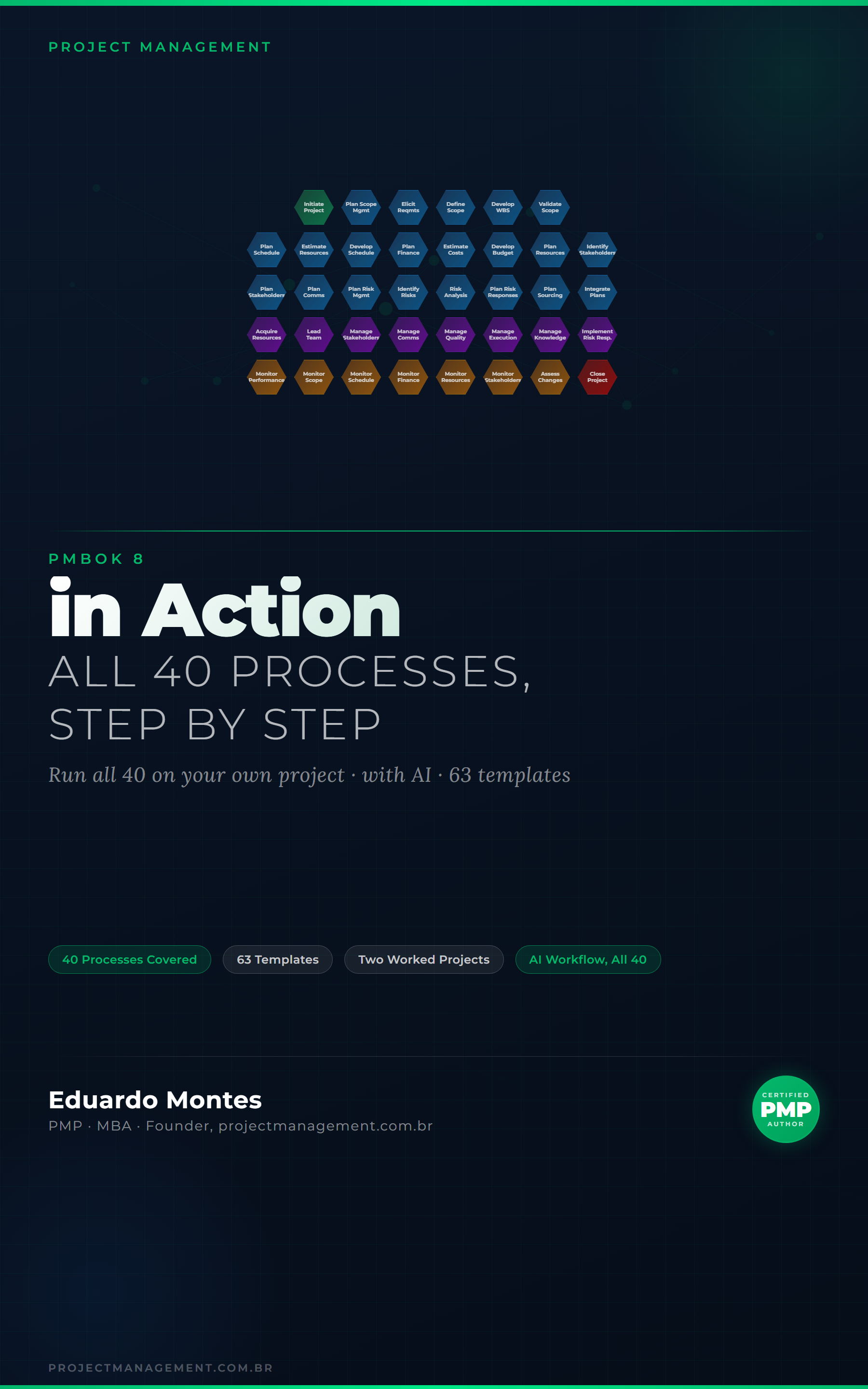
Go deeper in the book
PMBOK 8 in Action
The 40 processes of the PMBOK 8 Guide applied to one real project, with the finished artefact at every step.
See the book — US$ 9.98 →
 Project Management